
Official_BepInEx_ConfigurationManager
Azumatt
Mod to assist with configuration of BepInEx mods
Install Official BepInEx ConfigurationManager in the same r2modman or Thunderstore Mod Manager profile as your Valheim mods, then launch the game with Start modded and press F1 in game. The panel only lists plugins that actually loaded and settings they expose through BepInEx Config; it cannot configure a missing or incompatible mod.
Mod to assist with configuration of BepInEx mods

BepInEx pack for Valheim. Preconfigured with the correct entry point for mods and preferred defaults for the community.
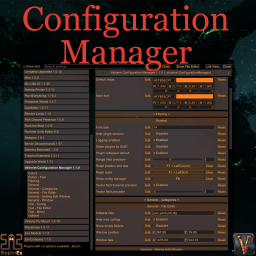
Localized, recolored, refined. Split view mode. Config files editor. Setting edit window. Changed values are highlighted. Prevent user input or pause the game while window is open. Window scale depends on game scale.
In r2modman or Thunderstore Mod Manager, select the Valheim profile you actually play, search for Official BepInEx ConfigurationManager by Azumatt, and install it with dependencies. Keeping it in the profile avoids mixing its files into an unrelated vanilla or test setup.
Start Valheim with the manager's Start modded button, not a normal desktop or Steam shortcut that bypasses the profile. BepInEx must load first; after entering the game, press F1, which is the Configuration Manager's documented default hotkey.
The left side lists loaded plugins or exposed configuration files. Search for a mod name, select it, expand the relevant section, and read each setting description before changing a value. A mod with no BepInEx Config entries has nothing for this panel to show.
If F1 does nothing, first check for a hotkey conflict, then confirm the BepInEx console or log shows ConfigurationManager loading. Verify its DLL is under that profile's BepInEx/plugins tree and that the profile uses a supported BepInEx version; reinstall the package rather than copying random DLLs between profiles.
Whether a value applies immediately is controlled by the mod that owns it. Some mods listen for live changes, while others rebuild data only at world load or process start. Follow that mod's README and restart the world or game whenever its documentation requires it.
In multiplayer, Configuration Manager is only an editor UI; it does not make a client value authoritative or synchronize arbitrary configs. Server-synced or admin-only values may be locked or overwritten. Change authoritative settings on the server as the mod documents, and fall back to the relevant BepInEx/config/*.cfg or other documented config file when no GUI control is available.
New to mods? Read the install & configuration guide. Read the full install & configuration guide →