
ZenPlayer
ZenDragon
Hide helmet visual, equip gear after swim, equip while running, control riding stamina usage, death & skill loss, durability, food, health, inventory, sleep, stamina, knowledge, autopickup, per-player difficulty
Yes, but “keep inventory” should mean that your items are still on your character after respawning. ZenPlayer documents a Drop On Death setting of None for that result. TombstoneLock only controls who can open the grave, and AzuSkillTweaks only changes skill loss; neither prevents inventory drops.
Hide helmet visual, equip gear after swim, equip while running, control riding stamina usage, death & skill loss, durability, food, health, inventory, sleep, stamina, knowledge, autopickup, per-player difficulty

Lets you configure who can access your tombstone. Can also remove tombstones after a time.
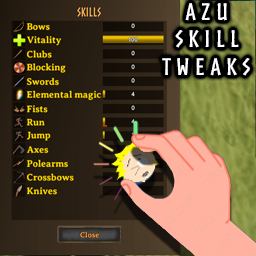
Mod that allows tweaking of skill gain factors and percent of skill loss on death. Ripped out from OdinsQOL.
A true keep-inventory setup leaves the carried items on your character when you respawn instead of putting them in a tombstone. ZenPlayer's current README explicitly documents Drop On Death = None as “drop nothing” and keep all inventory; its Always and Never lists can override that rule.
TombstoneLock solves a different multiplayer problem. It controls whether everyone, only the owner, or the owner's group may open a tombstone. You still drop the items and still need a corpse run, so grave ownership is not keep inventory.
AzuSkillTweaks also addresses a separate penalty. Its Death Penalty Factor Multiplier changes skill loss and is server-synchronized, but it does not retain carried items. Use it only when lost skill progress is the issue.
Valheim has a built-in Death Penalty world modifier, and the official dedicated-server guide lists casual, veryeasy, easy, hard, and hardcore values. The official guide does not document any preset as full keep inventory, so verify the current in-game description rather than assuming a softer preset meets that definition. ZenWorldSettings no longer documents player death-drop control; that functionality moved to ZenPlayer.
For multiplayer, decide one authoritative death rule, install the required mod on the server and clients as its README requires, and keep synchronized values identical. Back up the world and avoid stacking multiple mods that patch the same death flow.
New to mods? Read the install & configuration guide. Read the full install & configuration guide →